Proxies? Handled.
Stringout is automatic proxy software for remote editing teams. Share a project and it makes an HEVC proxy of every clip, matched to the camera file’s name, timecode and reel, and delivers it to your editors’ Finder, in your bins. Nobody on your team babysits a render queue again.
No footage needed. We bring a sample project.
Pro is $24 USD per person per month. A supervisor and two remote editors is $72. See pricing
Updated
- You do
- Share the project
- Stringout makes
- An HEVC 1080p proxy of every clip
- It keeps
- Clip name, timecode and reel
- Editors find it in
- Finder or File Explorer
- Not available
- ProRes, DNx or custom LUTs
- You prepare on
- A Mac with Apple Silicon
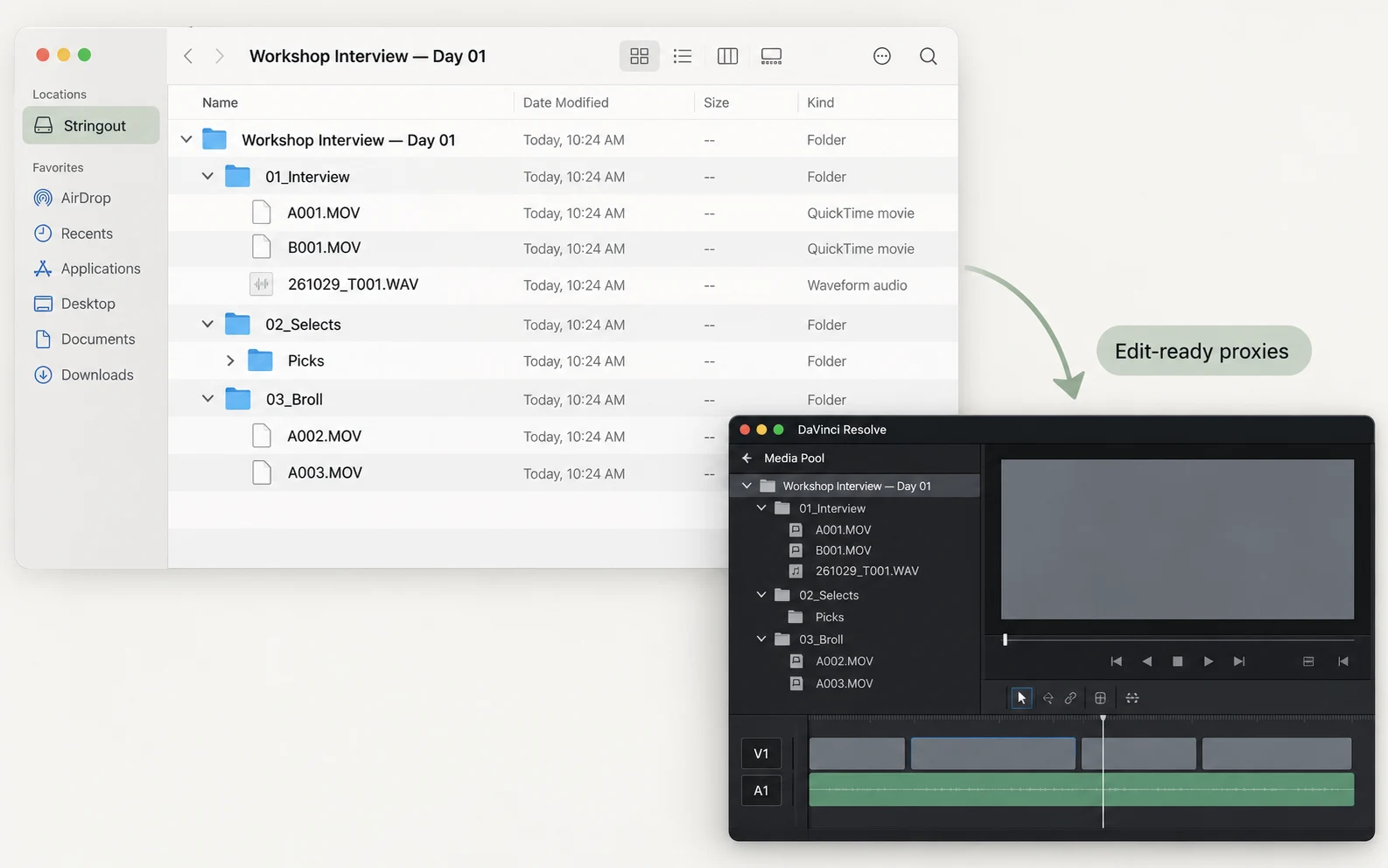
Who is still making proxies by hand?
| Job | The usual way | With Stringout |
|---|---|---|
| The render queue | The usual way: Picking presets and babysitting transcodes at 11 at night. | With Stringout: Sharing the project starts every proxy. No presets, no queue. |
| The renaming | The usual way: Keeping names, timecode and reel in step so the relink does not explode. | With Stringout: Each proxy keeps the camera file’s clip name, timecode and reel. |
| The delivery | The usual way: Uploading, shipping and answering “which folder is it in?” for the rest of the job. | With Stringout: Proxies arrive in Finder or File Explorer, in your project’s bins. |
What does it take to make the proxies? Sharing the project. That’s it.
Stringout is a fully automated proxy workflow for remote editing. Sharing a project makes an HEVC editing proxy of every clip and publishes it to your team. There is no transcode preset to pick and no drive to ship. Until a clip’s proxy is ready, its file plays as Media offline.
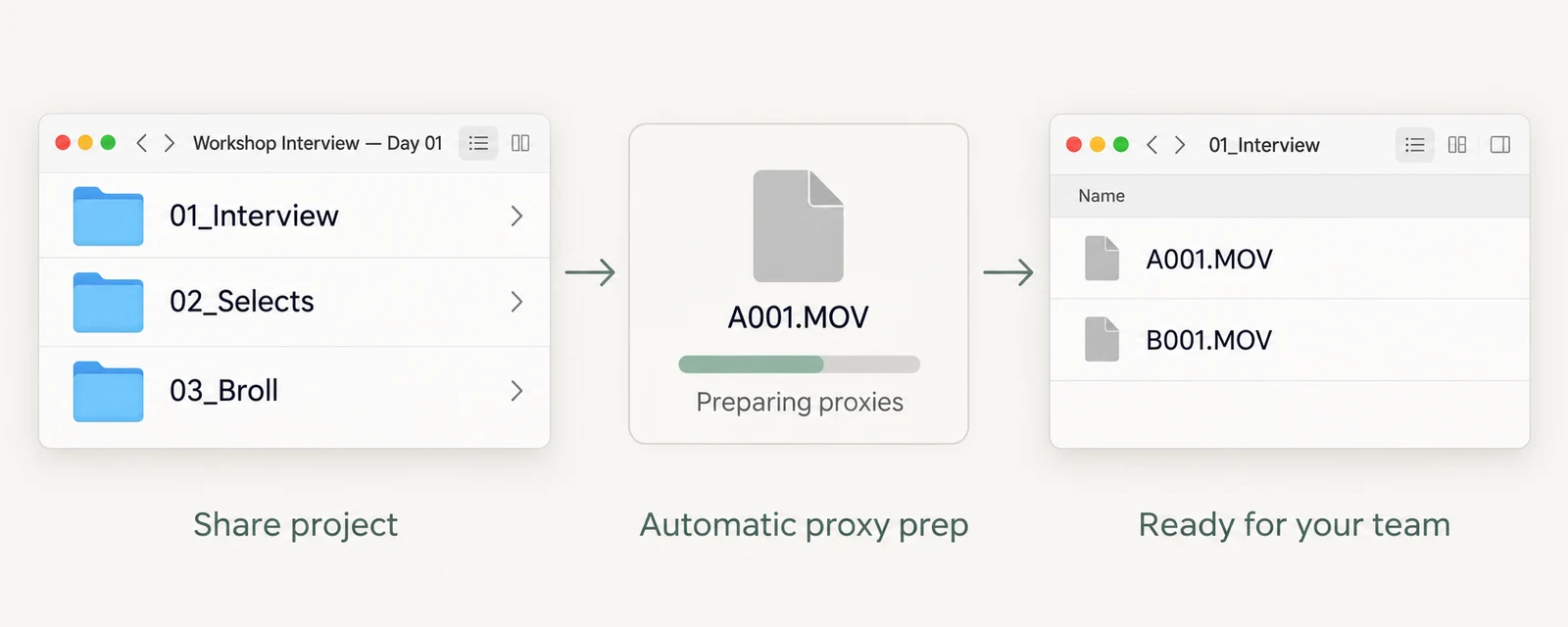
Where do editors find them? Right where they expect, in Finder.
Editors browse the project’s bins, or the source folders as they sit on your drive, in Finder on Mac or File Explorer on Windows. Both views use the camera’s clip names, so nobody has to ask where a take is or which version is current.
Stringout keeps its own bins. It does not import bins from another editing app.
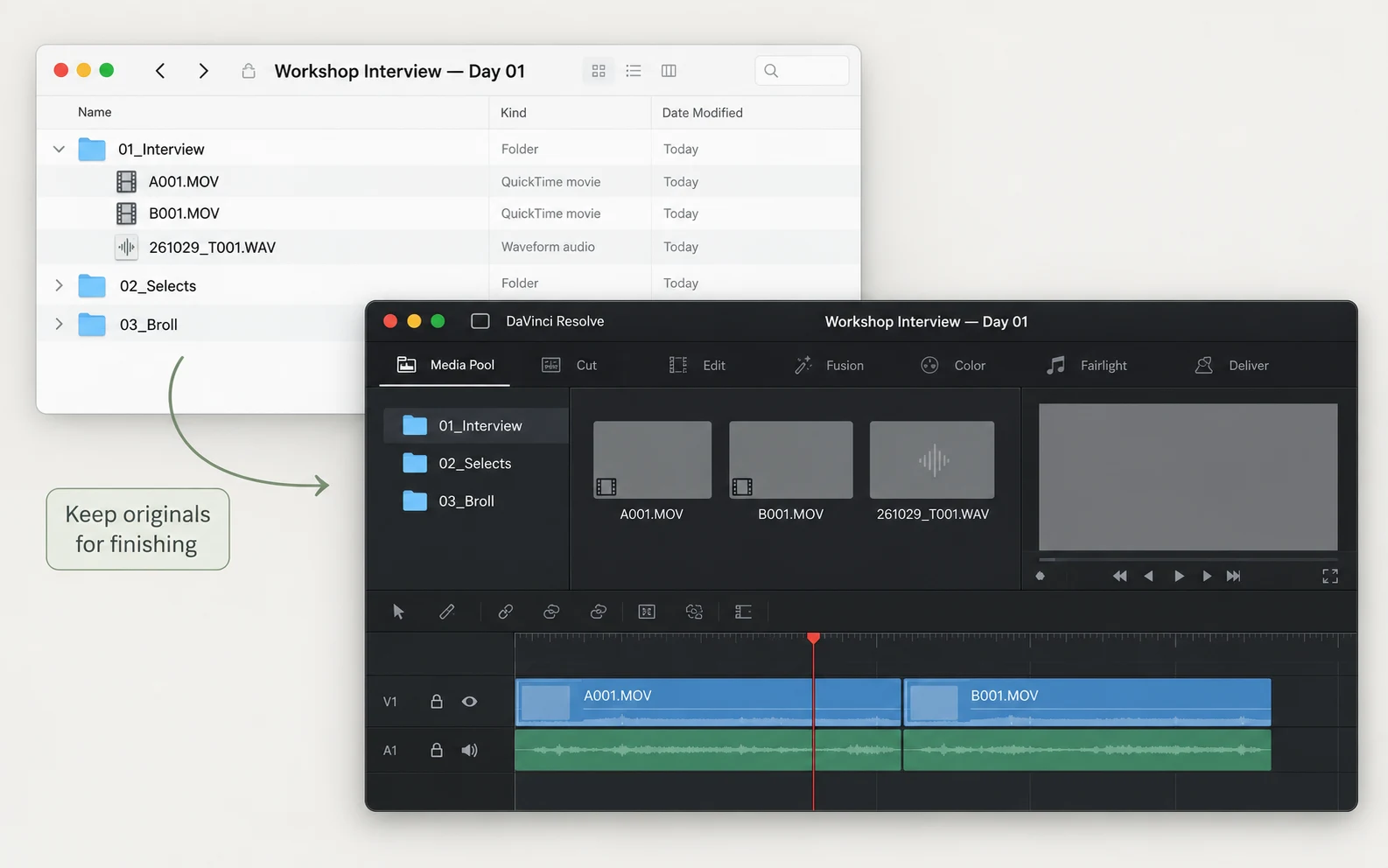
Will the relink to the originals work? Every proxy carries what the relink needs.
Each proxy keeps its camera file’s clip name, start timecode, reel, frame rate and frame count. Those are what an editing app matches when you relink to the camera originals for color and finishing, so cutting on proxies never strands the online.
Proxy attachment and relinking work differently in Premiere Pro, DaVinci Resolve and Final Cut Pro. The illustration uses Resolve.
| Property | Camera original | Proxy |
|---|---|---|
| File | CAMERA/A_CAM/A001.MOV | 01_Interview/A001.MOV |
| Location | Your drive | Finder or File Explorer |
| Codec | As recorded | HEVC |
| Frame size | As recorded | 1080p from HD and larger |
| Clip name, timecode, reel | As recorded | Same as the original |
| Frame rate and count | As recorded | Same as the original |
| Audio | As recorded | 48 kHz PCM, same channel count |
Card to cut. Your whole post pipeline, in one app.
Most teams are still taping together a transcoder, a sync tool, a transfer service and a remote desktop. With Stringout, one project carries the footage from the copied cards to the editor’s timeline, on storage you already own, at one price per seat. Be the team that figured this out first.
- PrepPrep the shootOrganize the copied cards, sync sound and cameras, and build the stringout on your Mac.DIT workflow automation →
- ProxiesThis pageShare the proxiesShare the project and Stringout makes and publishes an HEVC proxy of every clip.
- Remote editBring in the editorThe editor opens the bins in Finder or File Explorer and cuts in their own app.Remote video editing →
Check the fit before you book.
- Prepare and share on
- A Mac with Apple Silicon
- Proxy format
- HEVC, 1080p from HD and larger sources
- Not available
- ProRes or DNx proxies, and custom LUT presets
- Editors open media in
- Finder on Mac. File Explorer on Windows, as a read-only beta.
- Ready when
- Preparation and publishing finish after you share
- Seats
- One Pro seat for each person in the project. Seats can’t be shared.
Works with Adobe Premiere Pro, DaVinci Resolve, Final Cut Pro, OpenTimelineIO, HEVC (H.265).
One flat price. No storage bills. No AI credits. No surprises.
Free
$0on your own Mac
Stringout on your Mac: on-device transcription, search, sync and assembly. Export EDL/ALE, OpenTimelineIO or a rendered movie. Try File Streaming between two of your own computers on one local network.
ProBest for this workflow
$24USD per person per month
Everything in Free, plus joining a team, automatic proxies in Finder and File Explorer, File Streaming over the internet, original transfers and opening a cut directly in Premiere Pro, DaVinci Resolve or Final Cut Pro.
Every person in a shared project needs their own Pro seat, including each remote editor, and seats can’t be shared. A supervisor and two remote editors is 3 × $24 = $72 USD a month.
Billed monthly. Stringout sells no AI credits or cloud storage. Enterprise adds SAML SSO, roles and invoice billing.
Private by default. Your footage stays yours.
Originals stay on your storage.
Team sharing uploads editing proxies. Camera files move only when a teammate requests one.
Analysis runs on your Mac.
Transcription and visual analysis happen on the computer that holds the footage.
No AI-generated pixels.
Stringout organizes and arranges your footage. It does not train on your data.
Common questions.
15-minute demo
Watch a project’s proxies make themselves.
Book a 15-minute demoNo footage needed. We bring a sample project.

Your demo is with Theo PakFounder, Stringout
What you’ll see
- Sharing a project and watching its proxies make themselves.
- What your editors see in Finder or File Explorer.
- Relinking to the camera originals in your editing app.
Then we check the fit with your storage, team and editing app.
No footage needed
Book a 15-minute demo